


Are you a NOUN student looking for your online facilitation timetable or how to participate in online classes? NOUN Online Facilitation allows students to interact with course facilitators through live video sessions, discussion forums and online chats.
The National Open University of Nigeria (NOUN) introduced online facilitation to help students understand their course materials and receive academic support without having to attend a physical classroom.
Here is how the programme works, how to check your facilitation timetable and how to access the online activities.
What Is NOUN Online Facilitation?
NOUN Online Facilitation is an online teaching and learning activity where students interact with course facilitators about their registered courses.
The activities include live video conferencing, discussion forums and online chats. During video sessions, facilitators explain topics in the course materials and answer students’ questions. Discussion forums allow students to contribute to questions posted for their courses.
How Does NOUN Online Facilitation Work?
NOUN online facilitation involves three main activities:
1. Video Conferencing Sessions
A facilitator conducts a scheduled online session, usually lasting one hour. During the class, the facilitator explains selected topics from the course material and answers questions from students.
NOUN’s original facilitation announcement states that video sessions are recorded and made available on the Learning Space for students who cannot attend live. Check your course page for available recordings.
2. Discussion Forums
Discussion forums allow students to answer academic questions posted under their registered courses.
To participate, log in to the eLearn portal, open the relevant course and select the weekly discussion activity. Read the question and submit your contribution according to the instructions.
NOUN’s FAQ explains that students must read the Academic Integrity Form on each course page before accessing the weekly discussion questions. Your discussion contributions may also be assessed.
3. Online Chat Sessions
Online chats provide a way for students to communicate with facilitators and other students about course-related matters.
You can participate using an internet-enabled smartphone, tablet, laptop or desktop computer.
How Do I Check My NOUN Online Facilitation Timetable?
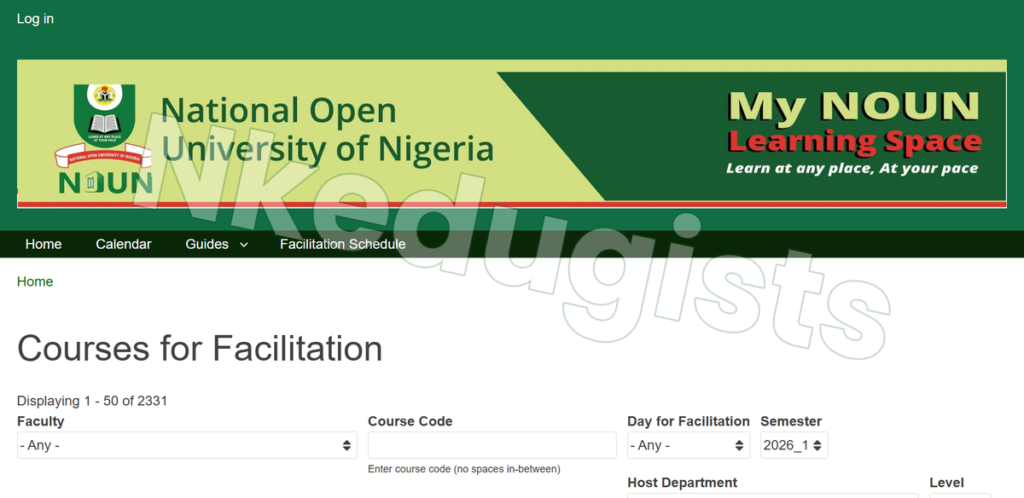
You can check your NOUN facilitation timetable on the official MyNOUN Learning Space website.
Follow these steps:
- Visit https://mylearningspace.nou.edu.ng/info/facilitation-timetable.
- Select your current semester from the semester filter.
- Enter your course code in the course-code search box.
- Select any other filter you need, such as level or faculty.
- Check the result for your facilitator, scheduled day and time.
The timetable displays the course code, facilitator’s name, email address, faculty, level, day and time where the information is available.
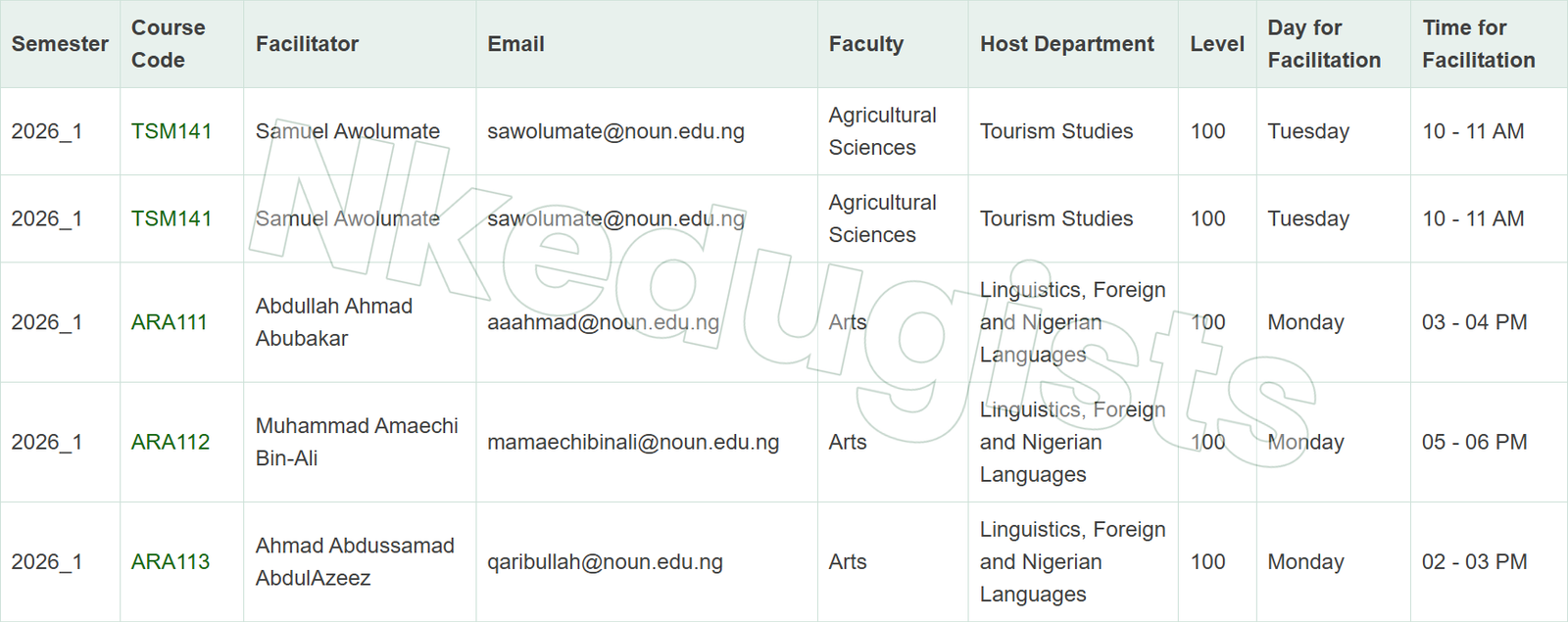
Make sure you select the correct semester. A timetable for an earlier semester may show different facilitation dates and times.
How Do I Join NOUN Online Facilitation Classes?
To join an online facilitation class, log in to the NOUN eLearn portal and open the course you want to attend.
- Visit https://elearn.nou.edu.ng/.
- Log in with your student account.
- Open the course you have registered for.
- Look for the scheduled live facilitation activity or session link on the course page.
- Open the activity at the scheduled time and follow the instructions provided.
You should check the course page before the scheduled class so you can locate the session link. The timetable tells you when a course is scheduled; the course page provides the learning activities and access details.
What Should I Do If I Miss a NOUN Online Facilitation Class?
If you miss a live facilitation session, check your course page for a recording or other materials provided by the facilitator.
NOUN’s original online facilitation announcement states that video conferencing sessions are recorded and made available on the Learning Space for students who cannot attend the live class.
You can also use the course materials and discussion forum to follow the topics covered.
How Do I Access NOUN Discussion Forum Questions?
To access your discussion forum questions, follow the steps provided in NOUN’s official:
- Visit https://elearn.nou.edu.ng/ and log in with your student details.
- Open one of your registered courses.
- Read the Academic Integrity Form on the course page to the end.
- Open the relevant weekly activity.
- Read the discussion question and submit your contribution.
Repeat the process for the other registered courses with discussion activities.
Why Can’t I See My Courses on NOUN eLearn?
If your registered courses are not showing on eLearn, check whether you have completed the required examination registration.
NOUN’s FAQ states that students will need to wait up to two working days after completing examination registration for access to become available.
If your courses are still missing after that period, contact the university’s Learning Content Management System (LCMS) support team for assistance.
What Is the Official NOUN Online Learning Portal?
The official NOUN eLearn portal is https://elearn.nou.edu.ng/. Students use it to access their registered courses, discussion forums, learning activities and other online academic resources.
The MyNOUN Learning Space is available at https://mylearningspace.nou.edu.ng/ and provides the facilitation timetable and other learning information.
Recommended NOUN Articles
NOUN students should check their course facilitation timetable and eLearn accounts regularly for scheduled classes, discussion questions and other learning activities.
